
How it works
Four steps. You do the first two once. Your team does the third every shift. The fourth is what you look at on Monday.
Capture what you already have
Photograph the display case or the menu board. Upload the menu PDF. Paste your website address and Trainseed reads it (it never changes anything). Prep sheets and recipe cards work too.
Every item comes out with its name, description, ingredients, allergens and price. Photo crops attach to the item so pictures can be used in questions later.
HEIC photos from a phone are fine. Bad crops can be removed before anything is published.
Approve, then assign
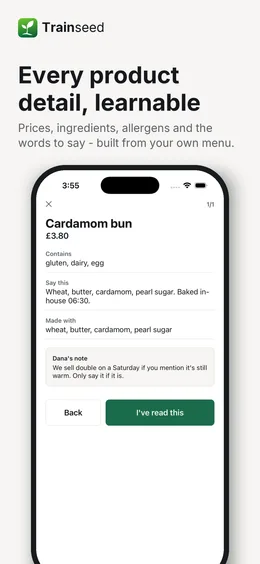
Each item gets a short lesson and three questions across five formats: multiple choice, photo identification, order of steps, roleplay and voice. Anything about allergens or food safety is flagged required automatically.
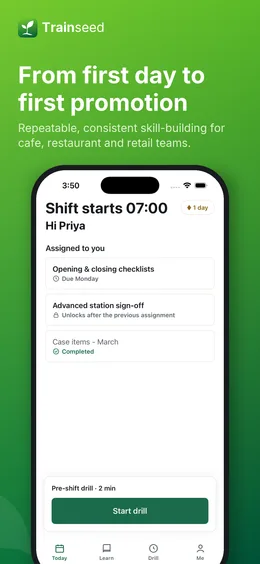
You edit the facts, fix the currency, swap a photo and approve. Then assign by role, by station, or to a named person. New hires get a starter plan the moment they accept their invite: Day 1 before their first shift, then one block for each of their first five shifts.
Nothing reaches your team until you approve it. Generated questions stay in draft.
Drill before the shift
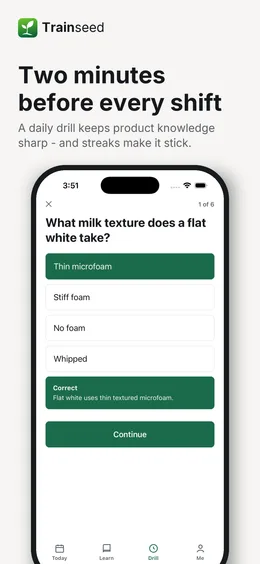
Up to six questions, under two minutes, one-handed. The order is deliberate: what someone got wrong recently comes first, then what changed on the menu this week, then their assigned questions, then a random one from the published set.
Missed questions resurface after one day, three days, seven days, then twenty-one. Three right answers in a row clears the weak spot. Streaks pause on days off. A wrong allergen answer never touches the streak, but it always creates a weak spot.
Runs in any phone browser and keeps working offline once loaded. No app store visit required, and the Android app is on Google Play for anyone who wants it.
See who is ready
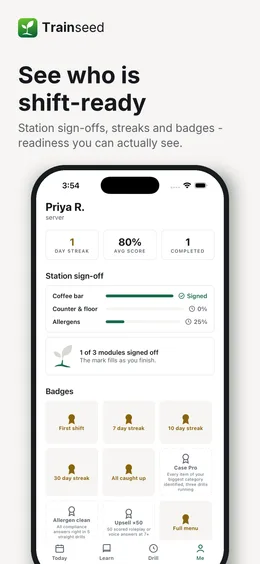
Readiness by person and by item. A weakest-items panel. Station sign-offs so you know who can open the coffee bar before you hand over the keys. A weekly huddle pack to print or read out.
Allergen results are reported on their own, per person, so the answer to "who knows the allergens" is a list, not a feeling.
The "Trainseed suggests" card points at the one thing worth fixing this week.
When the menu changes
Re-upload it. The weekly drill picks up new items, new prices and anything that is gone. History stays put.
When someone new starts
Invite them by text or email. Day 1 of their starter plan is waiting before their first shift, and it stays in their app to review after it.
Where AI fits
It writes the draft from your menu and scores roleplay answers. You approve everything. Your content is never used to train models.
Your menu is already the training. Let it draft itself.
Start a 14-day free trial. No card, no setup fee. Photograph your menu and the first drill drafts itself.
Start your free trial
14 days free, no card needed. Pick Solo or Shop when it ends.
Already have an account? Sign in